We Care, Production Should Not Stop.

(+91) 9822444915 anadiinfotech@gmail.com
Available 24/7/365
  • HOME
  • MANUFACTURE
    • ALLEN BRADLEY
    • MONITOUCH
    • WELNTEK
    • B & R
    • PANASONIC
    • NATIONAL INSTRUMENT
    • ERHARDT+LEIMER
    • SCHNEIDER ELECTRIC
    • AGILENT TECH
    • FANUC
    • SIEMENS
    • RENU
    • KUKA
    • YASKAWA
    • PRO-FACE
    • LENZE
    • KOLLMORGEN
    • WOODWARD
    • MITSUBISHI
    • FUJI
    • REO ELEK TRONIK
  • REPAIRING & MAINTAINACE
  • SELL YOUR SURPLUS
  • MORE
    • About Us
    • Career
    • Contact Us
    • Blog
    • News & Awards
    • Faq
    • Case Studies
automation

How HMI Works: The Brain Behind Industrial Interaction

How HMI Works: The Brain Behind Industrial Interaction

A Human Machine Interface (HMI) screen works as the central point of interaction between operators and industrial machines. But what’s happening behind that responsive touchscreen? Let’s break it down.


The Core Concept of How HMI Works

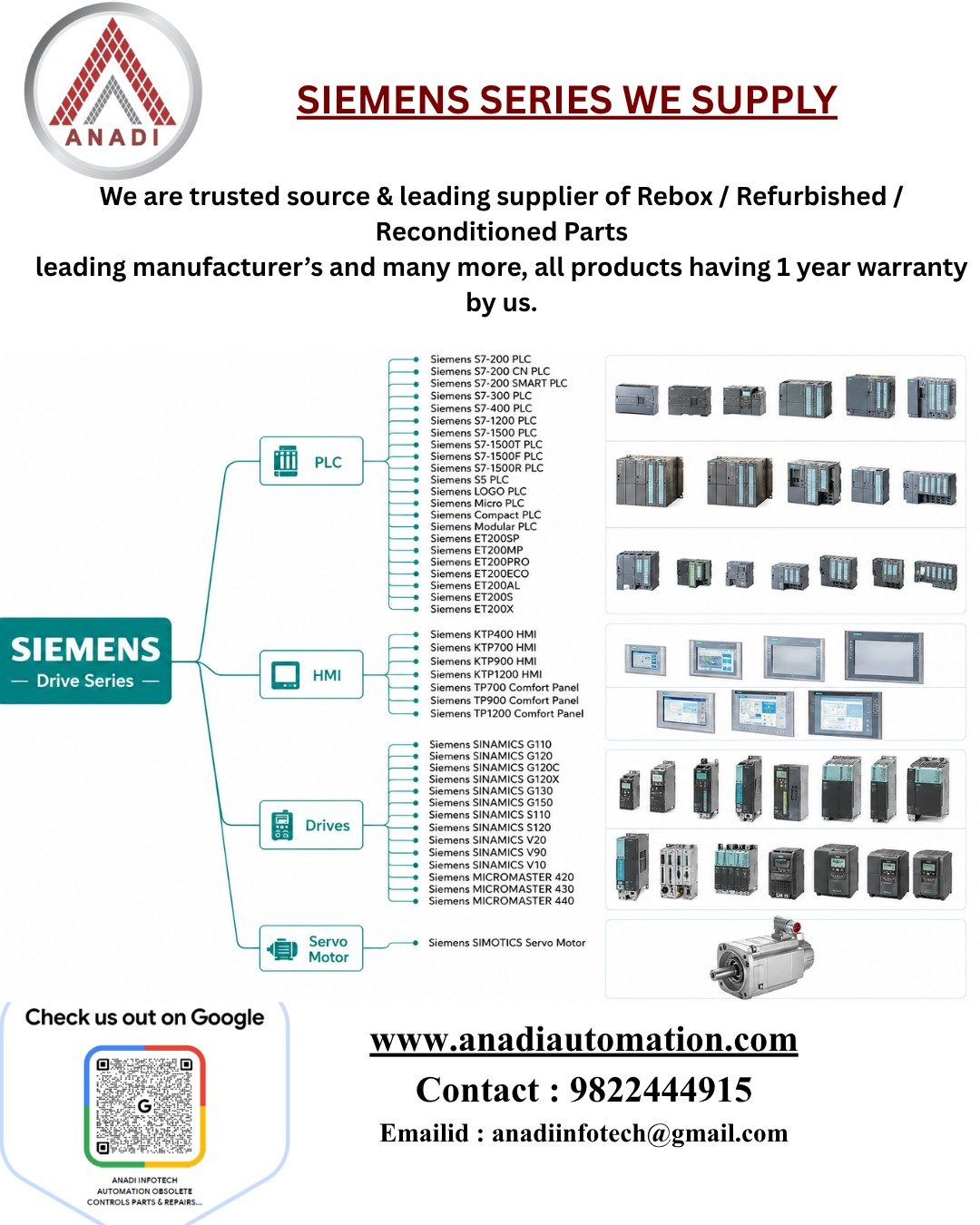
At its core, an HMI screen works by receiving data from a controller (usually a PLC or PAC), processing that data, and visually displaying it to the operator in real time. The operator can then respond by touching the screen or using buttons to send commands back to the machine.

It’s a two-way communication system:
Machine → HMI → Human → HMI → Machine


Step-by-Step: How HMI Works in Real-Time

1. Data Collection from PLCs or Sensors

The HMI gets real-time input from:

  1. Programmable Logic Controllers (PLCs)
  2. Sensors (e.g., temperature, pressure, speed)
  3. Other field devices (like drives or valves)

Communication happens via protocols like Modbus, Ethernet/IP, or Profibus.


2. Processing and Visualization

The data is then processed by the HMI’s internal software. It interprets sensor values or machine states and converts them into:

  1. Graphs
  2. Icons
  3. Meters
  4. Alarms
  5. Status messages

Operators see this live data on the HMI screen in a graphical format, making complex processes easier to understand.


3. User Input and Control

Touching a button or icon on the HMI sends a command back to the PLC or machine, such as:

  1. Start/Stop operations
  2. Adjust a setpoint
  3. Reset an alarm
  4. Change machine mode

The HMI acts as the middleman, instantly converting user actions into machine-readable commands.


4. Feedback Loop

Once the machine receives a command, it updates its internal state. This change is sent back to the HMI, which updates the screen—creating a closed feedback loop for real-time control and monitoring.


Simplified Example: Packaging Line HMI

  1. The HMI shows the current speed of the conveyor belt
  2. The operator taps a button to slow it down
  3. The HMI sends a command to the PLC
  4. The PLC adjusts the drive speed
  5. The new speed is sent back and updated on the screen

This entire process happens in milliseconds.


Final Thoughts

HMI screens work by bridging the gap between people and machines, enabling safe, efficient, and real-time control of industrial systems. Their power lies not in the hardware alone, but in their ability to process, display, and act on live data in a way that humans can easily understand.

Related Blogs
  1. What is Human Machine Interaction
  2. Inside an HMI Screen
  3. Top 17 Applications of HMI
  4. HMI Programming

Post navigation

⟵ Top 17 Applications of HMI
Inside an HMI Screen: How It’s Made & What It’s Made Of ⟶

Mitsubishi FX1N-40MR-ES-UL PLC for Reliable Automation

Mitsubishi FX1N-40MR-ES-UL Programmable Controller is one of the most efficient programmable controllers on the market. It is equipped with 40…

Mitsubishi FX3U-32MR/ES PLC for Industrial Automation

FX3U-32MR/ES PLC by Mitsubishi is a highly advanced and compact programmable logic controller which is used for automation in industries.…

ALLEN BRADLEY 1769-IF4XOF2 ANALOG INPUT OUTPUT MODULE

Allen Bradley 1769-IF4XOF2 Analog Input Output Module is a sturdy and compact device that offers exacting results when working with…

Anadi Automation

Industries multidisciplinary team of engineering experts can successfully carry out projects of any size and complexity. Our team offers the most up-to-date sustainable and trusted suppliers of quality control.

QUICK LINKS

  • Manufacturer
  • Repairs & Services
  • About Us
  • Blog
  • FAQ
  • Contact Us

ADDRESS

Address:
Anadi Automation, Plot No 13, Lekha Nagar
Bypass Rd, behind Chadda Water Tank
near Old Skoda Showroom, Rajiv Nagar,
Nashik, Maharashtra 422009

CONTACT DETAILS

📧 anadiinfotech@gmail.com


📞 (+91) 9822444915


🕒 Available in 24/7/365


GSTIN: 27CECPK5099D1ZE

Terms & Condition | Privacy Policy
Fedex DHL Mastercard Paypal Visa

Disclaimer:
Anadi Automation is an independent reseller of surplus industrial automation products and an independent provider of industrial repair services. We source products through independent supply channels and are not affiliated with, authorized by, or sponsored by any of the manufacturers listed on our website. Anadi Automation is not an authorized distributor, agent, service center, or representative of any brand featured here. All trademarks, logos, brand names, and product identifiers are the property of their respective owners. They are used solely for reference and identification purposes and do not imply any partnership, sponsorship, or authorization by the original manufacturers.

Talk to us for better deals

×